Overview
Introduction to Daedum
Learn what Daedum does and the path from a CAD assembly in a STEP file to a published, interactive 3D manual.
What Daedum does
Daedum turns a CAD assembly, exported as a STEP file, into an interactive 3D manual that end users can follow in a browser. A manual combines ordered instructions with a focused 3D view of the assembly, so the end user can see both what to do and where to do it.

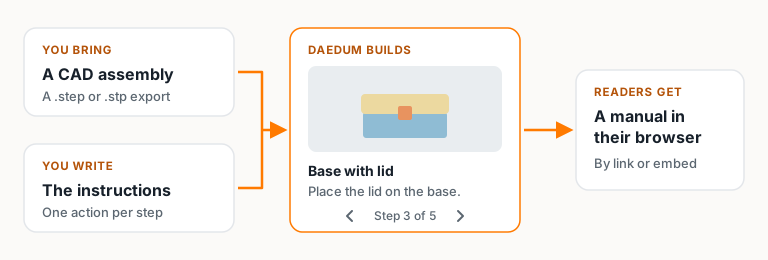
You do not need to understand every tool before you begin. Start with the basic path, then use the detailed guides when a particular part of the toolset becomes relevant.
Choose your starting point
If the product vocabulary is new, read Core concepts first. It defines Projects, manuals, sections, steps, parts, visibility, working manuals, and published versions.
If you want to make a manual now, follow Build and publish your first manual. It is the guided tour through the entire workflow from dashboard to published result. The Feature pages are focused references for one stage or feature of that workflow.
How the documentation is organized
Each tutorial will contain its own accordion style navigation. Each part of the tutorial is labeled for each feature that is going to be implemented. These labels correlate with more in-depth guides under the "Features" accordion located on the left nav. Don't worry much about about it though, because during each step there is a "Deep Peek" to get more information about specific features!
To get you started we have created a basic guide with 7 parts that will walk you though creating a manual for a Printed Enclosure.
- Create a manual and upload CAD explains names, Projects, CAD preparation, and conversion before editing.
- 3D steps: visibility, cameras, and moving parts explains visibility, instructions, procedure structure, and preview.
- Step types: 3D, Image, Text, and Section explains the different manual item types.
- Sections and build options explains the section menu and the option selector for manuals with more than one variant.
- Languages explains adding languages and translating step text.
- Publish, version, and embed explains versions, visibility, manual addresses, and embeds.
- Troubleshooting explains the states that commonly block progress.