Overview
Core concepts
Understand Projects, manuals, sections, steps, parts, published versions, and embeds before you build.
Who this guide is for
Read this guide if you are new to Daedum or need to understand how the editor's names map to the procedure your end users will follow.
The objects you work with
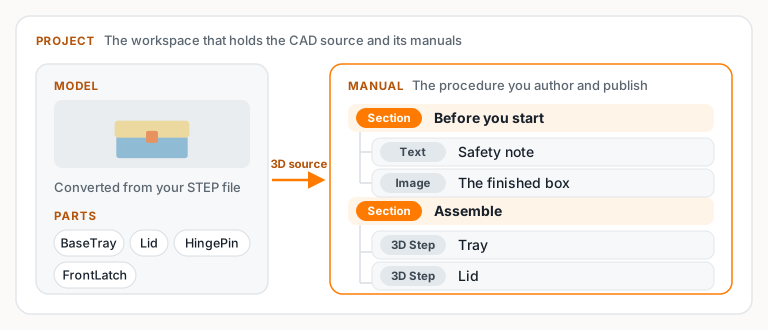
- A Project is the workspace that keeps the CAD source and related manuals together.
- A Manual is the procedure you author and publish. It is made from ordered manual items.
- A Model is the converted CAD assembly that provides the 3D geometry for 3D Steps.
- A Part is a selectable object within that model. Parts can be shown, hidden, focused, or identified for a step.
- A Section groups related items into a phase such as preparation, assembly, inspection, or maintenance.
- A Step is one end-user-facing item in the procedure. A 3D Step combines an instruction with a chosen assembly state; Image and Text items provide supporting information.
Working manual and published version
The Working Manual is the editable version in the builder. Changes to its text, order, visibility, and camera state are saved there first.
A Published Version is an end-user-facing snapshot. End users do not see later edits to the working manual until you publish another version. The Publishing panel controls which published versions are visible and which version opens by default.
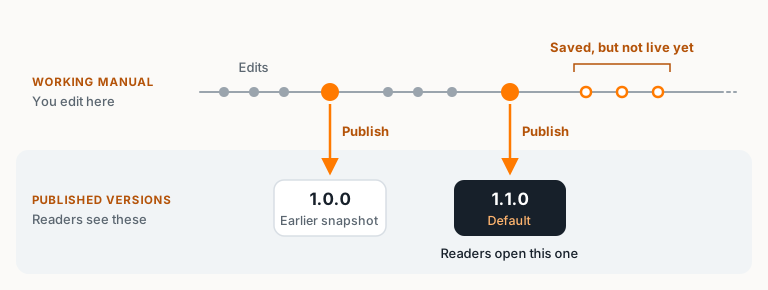
This separation lets you improve a procedure without changing what an end user is currently using.
Visibility and focus
Each 3D Step can present a different view of the same converted model. Visibility controls which parts are shown. Focus and camera controls determine what the end user notices first. Use both with the instruction: show enough context to orient the end user, but remove geometry that competes with the action.
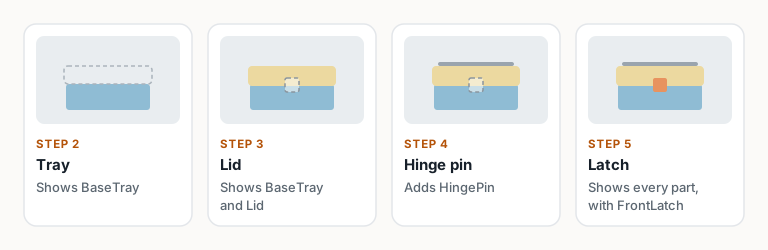
Required parts and visual indicators add guidance to a step; they do not replace a clear instruction or a useful camera view.
Languages, links, and embeds
Published manuals can expose the languages and versions supported by the published data — see Languages for adding a language and translating step text. A public manual address opens the end-user-facing procedure. An embed places that same ender user experience inside another website using the code from the Publishing panel.
Use a public link when the manual should open as its own page. Use an embed when the manual belongs inside a portal, help center, or product site.
What to do next
Start with Build and publish your first manual for one guided, complete workflow. If you already have a manual and CAD file, continue to Create a manual and upload CAD, then 3D steps: visibility, cameras, and moving parts.